27. Solution: Add Colors, Fonts, and Dimensions
Add Colors and Fonts Solution
In this exercise, you added colors, fonts, and dimensions to Sunshine to give it a unique and polished appearance.
Notes on Solution Code
Colors
To include the new primary, accent, text, and detail colors for Sunshine, your final colors.xml resources should look like the following code snippet:
<resources>
    <!-- COMPLETED (1) Add each of the colors required by Sunshine -->
    <color name="colorPrimary">#03A9F4</color>
    <color name="colorPrimaryDark">#0288D1</color>
    <color name="colorAccent">#FFD740</color>
    <color name="colorPrimaryLight">#B3E5FC</color>

    <color name="white">#FFFFFF</color>

    <color name="primary_text">#212121</color>
    <color name="secondary_text">#727272</color>

     <!--our detail accent colors -->
    <color name="detail_accent_pane_background">#455A64</color>
    <color name="detail_accent_label">#90A4AE</color>

    <!-- the activated state color for a forecast list item -->
    <color name="activated">#E0E0E0</color>
</resources>
Dimensions
Similarly, the new dimens.xml file that you create should include all the following dimensions:
<resources>
    <!-- Default screen margins, per the Android Design guidelines. -->
    <dimen name="forecast_detail_horizontal_padding">32dp</dimen>
    <dimen name="forecast_detail_vertical_padding">16dp</dimen>

    <!-- Icon Sizes -->
    <dimen name="today_icon">96dp</dimen>
    <dimen name="list_icon">40dp</dimen>

    <!-- Text Sizes - We are using DP here rather than SP because these are already large
         font sizes, and going larger will cause lots of view problems.  This is only for
         the large forecast numbers in the forecast list -->
    <dimen name="forecast_text_size">28dp</dimen>

    <dimen name="forecast_temperature_space">4dp</dimen>

    <!-- We will eventually use this to allow us to add additional padding for different screen
         sizes-->
    <dimen name="today_forecast_list_item_vertical_padding">16dp</dimen>
    <dimen name="list_item_icon_margin_right">24dp</dimen>
    <dimen name="list_item_icon_margin_end">@dimen/list_item_icon_margin_right</dimen>
    <dimen name="list_item_padding_horizontal">16dp</dimen>
    <dimen name="loading_indicator_size">42dp</dimen>
    <dimen name="list_item_high_temperature_margin">12dp</dimen>
    <dimen name="list_item_padding_vertical">12dp</dimen>
    <dimen name="list_item_low_temperature_text_view_size">48dp</dimen>
    <dimen name="list_item_date_left_margin">16dp</dimen>
    <dimen name="list_item_date_start_margin">@dimen/list_item_date_left_margin</dimen>

</resources>
Then all of these should be applied to the layouts, views, and margins for which they are named, and the final appearance of Sunshine (after this exercise is complete) is pictured below.
Solution Code
Solution: [S12.01-Solution-DimensionsColorsAndFonts][Diff]
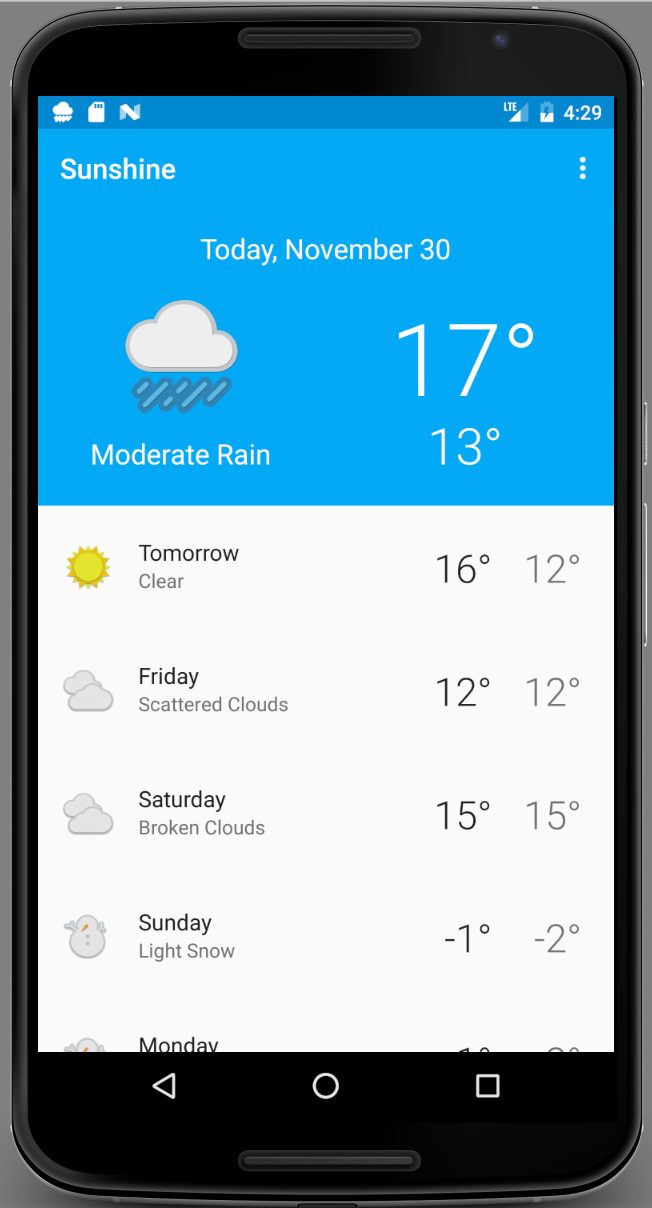
Sunshine after added colors, fonts, and dimensions.